Every tender, project and lead that fits your business, in one place
PursuitRadar watches official procurement sources and your own alerts, qualifies each opportunity with evidence, routes it to the right brand and prepares the response. You review and send.
- Live data from TED, SAM.gov, the World Bank and more
- Explainable relevance, never a guessed score
- Nothing is ever sent without you
 Get the Chrome extension (opens the Chrome Web Store in a new tab)
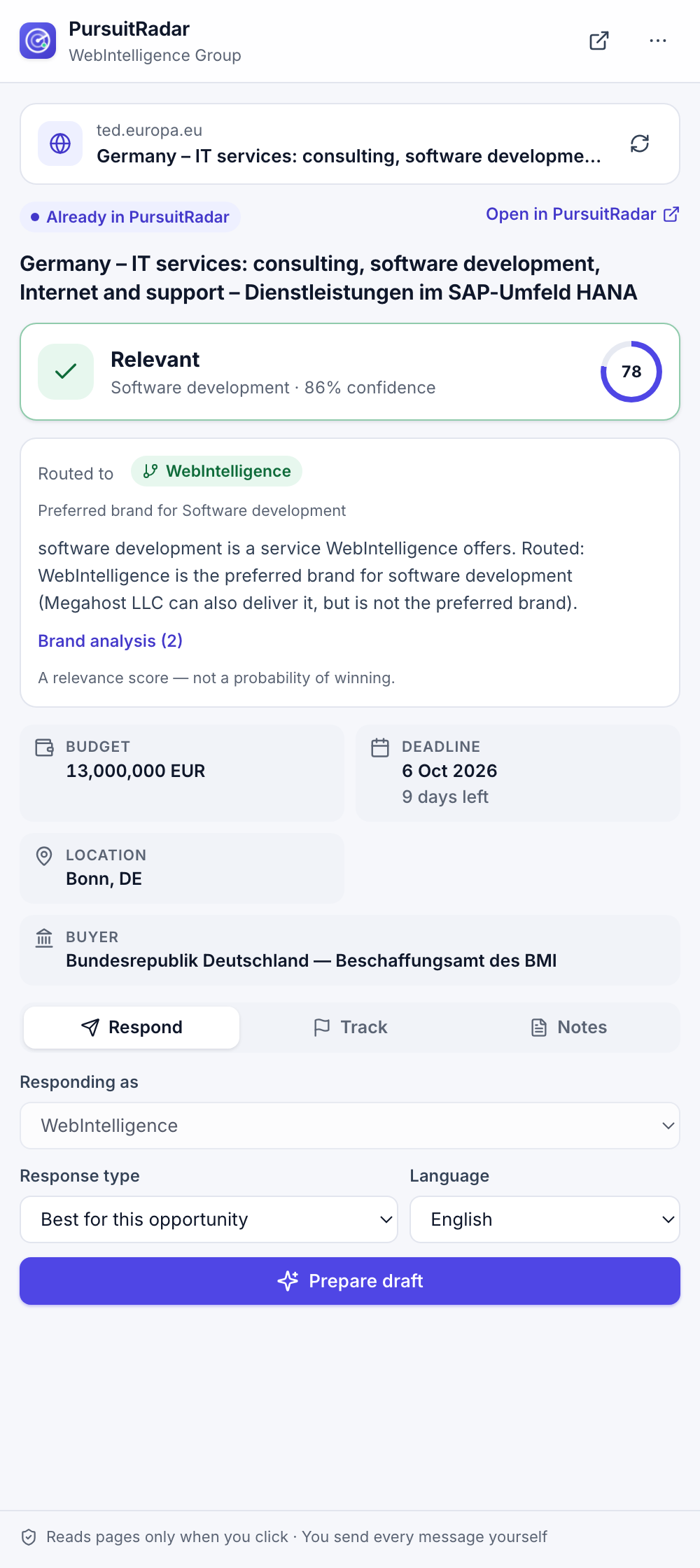
The PursuitRadar side panel on a live TED notice
Connected automatically to official sources
- TED
- SAM.gov
- World Bank
- EU Funding & Tenders
- Find a Tender
- Contracts Finder
- BOAMP
- Bekanntmachungsservice
- NYC City Record
- Los Angeles RAMP
How it works
From a notice on a portal to a reviewed proposal
- 01
Connect your sources
Switch on the official procurement feeds you want, forward your platform alert e-mails, or capture any page with the extension.
- 02
Qualify with evidence
Each opportunity gets a business intent and a relevance check against your real services. You see why, and unknowns stay unknown.
- 03
Route to the right brand
Run several brands in one workspace. Each opportunity goes to the brand that should answer it, following your rules.
- 04
Prepare and follow up
Drafts are written from that brand's verified facts only. You review, send from your own tools, and track it to a signed deal.
Capabilities
One workspace for the whole business-development cycle
Everything a small team needs to find, qualify and win more work, without juggling a dozen portals and spreadsheets.
Multi-source discovery
Procurement APIs, RSS feeds, alert e-mails, CSV and the Chrome extension feed one normalized, deduplicated list.
Evidence-based qualification
Business intent, relevance and the evidence behind them, so "software mentioned" is never mistaken for "wants development".
Multi-brand routing
Capability is not priority. Your rules decide which brand answers, and neither AI nor keywords can overrule them.
Proposal drafting
Proposals, cover letters and outreach in English, French or Arabic, checked for wrong-brand details and invented claims.
Partner discovery
Score agencies and consultancies for white-label, subcontracting and referral fit, not only as clients.
Pipeline and CRM
Companies, contacts, deals, tasks and follow-ups, with analytics by source, country and service.
Deadline tracking
Deadlines are stored with their real time zone, including daylight saving time, and surface before they pass.
Built for teams
Workspaces, roles and an audit log. Each workspace's data is isolated at the database level.
Qualification
Know why an opportunity is relevant before you spend time on it
A tender that buys software licences and a tender that commissions a new platform can use the same words. PursuitRadar separates them.
- A business intent for every opportunity, for example software development, hosting or licensing
- Relevance against the services you actually offer, with the evidence quoted
- A relevance score, never a "probability of winning"
Multi-brand
Several brands, one workspace, no mix-ups
Agencies often run more than one brand. PursuitRadar keeps each brand's facts, services and tone separate and sends each opportunity to the brand that should answer it.
- Supported, preferred and excluded services for each brand
- Only your explicit rules can change the default brand
- Drafts never mix the facts of two brands; a quality check enforces it
Chrome extension
Bring any opportunity page into your workspace
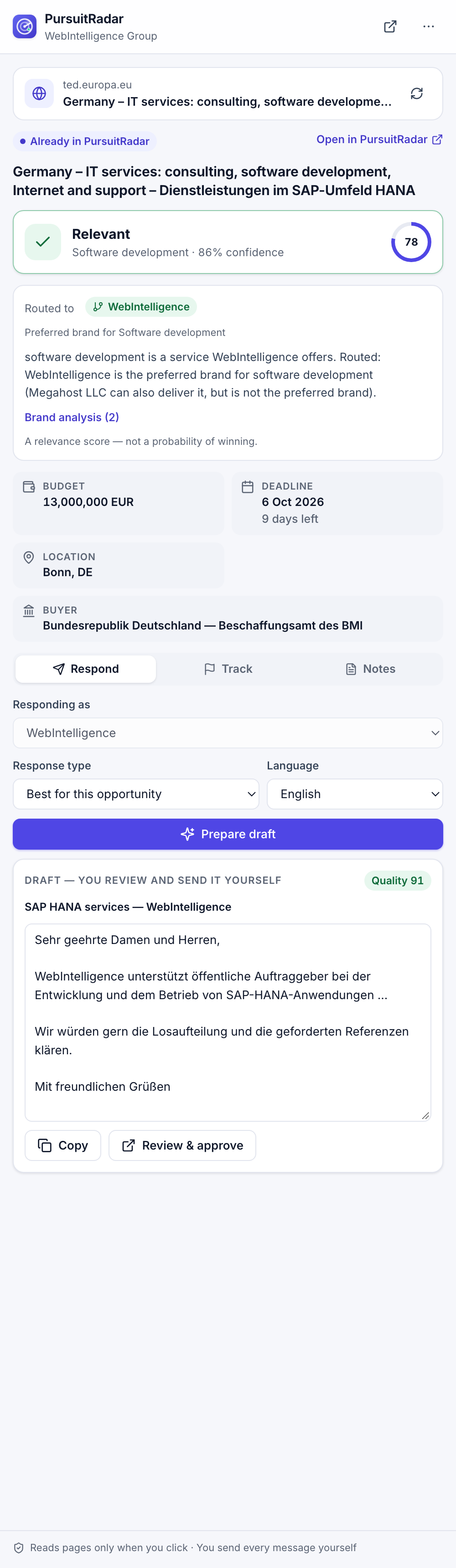
Open the side panel on a notice, a job or a company page. PursuitRadar reads the page only when you click, checks it against your workspace and prepares a draft you can copy.
- Dedicated readers for LinkedIn, Upwork, Freelancer, Malt, TED, BOAMP, SAM.gov and Morocco's public procurement portal
- Works on any page with a text selection or job data
- Reads nothing in the background and never posts for you
Automation
The routine runs on its own. The decisions stay yours.
Scheduled source syncs
Each connected source is checked on its own schedule, within the limits its publisher sets.
Alert mailbox import
Point PursuitRadar at a mailbox that receives your platform alerts. New alerts become opportunities automatically.
Automatic drafts
For every relevant, open opportunity, a draft is prepared as the routed brand, in the opportunity's language.
Morning digest
One e-mail each morning lists the drafts waiting for your review. Sending is always your decision.
Principles
Built to be trusted with your reputation
Official sources only
Public APIs and open data under their terms. No scraping behind logins, no CAPTCHA solving, no fake accounts.
You send, we prepare
Where a platform does not authorize automation, PursuitRadar prepares the work and you take the action.
Only verified facts
Drafts use the facts you verified for that brand. Claims that cannot be checked are flagged, not invented.
Isolated and private
Every workspace is isolated at the database level, and the extension reads a page only when you ask.
Who it is for
Made for teams that sell services
Digital agencies
Web, mobile and e-commerce studios that answer tenders and freelance projects.
Consultancies
IT and business consultancies following public procurement in several countries.
Hosting and IT providers
Managed hosting, cloud and DevOps companies looking for infrastructure contracts.
Multi-brand groups
Groups that run several brands and need every lead answered by the right one.
FAQ
Frequently asked questions
Where do the opportunities come from?
From official public procurement sources such as TED, SAM.gov, the World Bank, the EU Funding & Tenders Portal, the UK, French and German national services, and New York and Los Angeles open data. You can add RSS feeds, your platform alert e-mails, CSV files and pages captured with the Chrome extension.
Do you scrape LinkedIn, Upwork or Freelancer?
No. Their terms do not allow it. You can import their alert e-mails from your own mailbox, or open a page and capture it with the extension, one click at a time.
Will PursuitRadar submit bids or send messages for me?
No. It prepares drafts and tracks your pipeline. Submitting a bid or sending a message is always done by you, on the platform or from your own e-mail.
What does the score mean?
It measures how well an opportunity matches your services, with the evidence behind it. It is not a probability of winning, and information that is missing is shown as unknown.
Which languages are supported?
The app, the extension and the drafts are available in English, French and Arabic. Drafts follow the language of the opportunity.
Who operates PursuitRadar?
PursuitRadar is operated by Megahost LLC, a company based in Brighton, Colorado, USA.
See what is out there for your business
Create a workspace, add your company profile and connect the sources you care about. Your first qualified opportunities arrive within minutes.